
Every habit app you have deleted failed the same way. It asked at 07:00. You were not free at 07:00, so you snoozed it, and the notification went wherever snoozed notifications go. By the time you were free there was nothing on screen, and the day scored zero for something you would happily have done at eleven.
Complevia removes the single minute. A habit gets a window — 09:00 to 20:00, not a 09:00 alarm — and the app keeps asking inside it until you answer. There is no "reminder time" field anywhere in the editor, which is the whole design in one absence.
It runs two ways on the same habits: inside Telegram, where reminders arrive as messages you answer in the chat and nothing is installed, or as an Android app that keeps its own alarms. The screenshots below are the Android build.
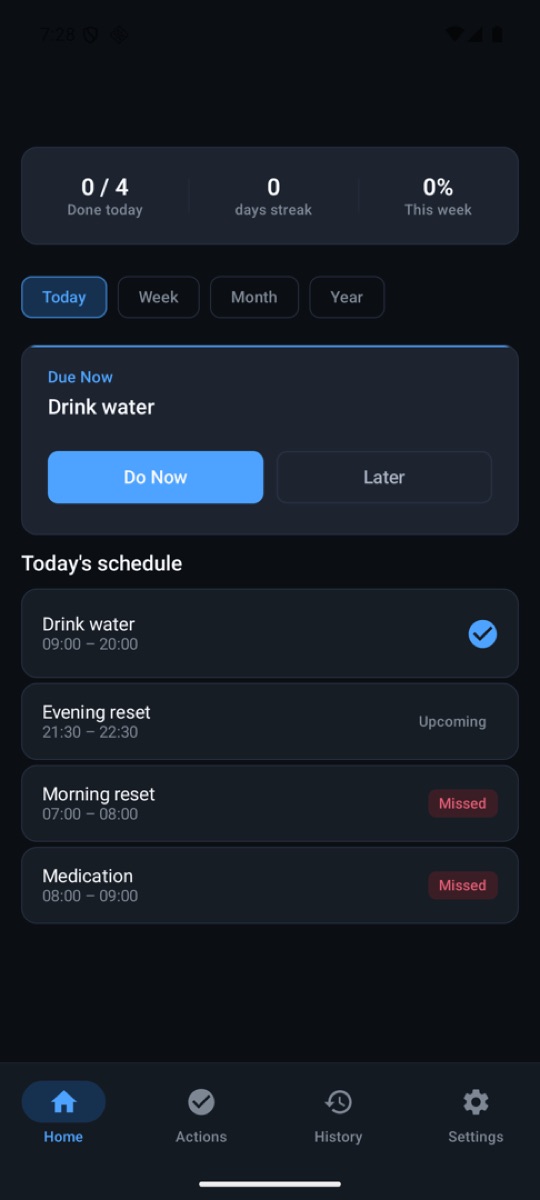
A window, not a minute
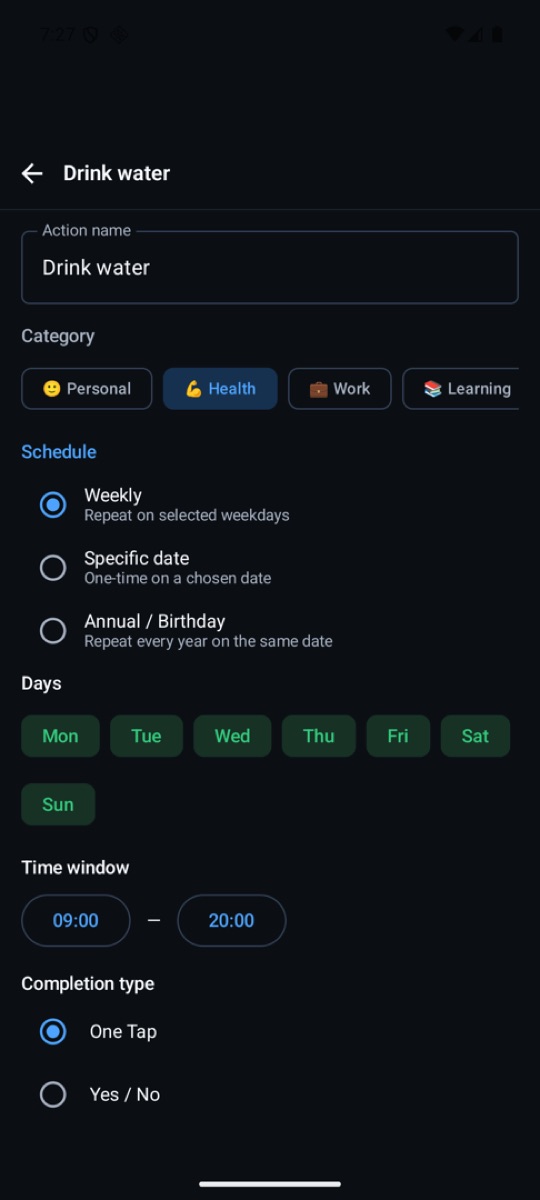
The editor has a weekday picker, a completion type, and one time control: a from and a to. That is the only place a time is entered. You are not choosing when to be interrupted, you are describing when the thing is possible.
Inside that window the app asks, and keeps asking, until you answer it one way or the other. Which means the answer "not now" costs you nothing: it is not a snooze that quietly loses the reminder, it is a fact the schedule already accounted for.
- Three levels of loud, and a ceiling you pick
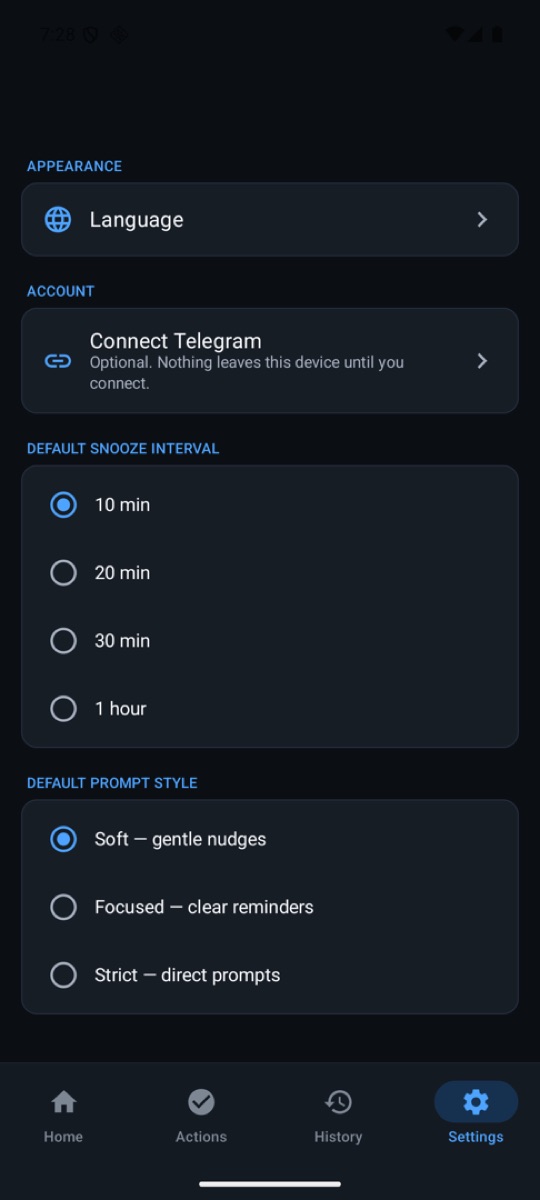
- An unanswered prompt comes back louder: a heavier vibration, then the device's own alarm tone on the alarm volume stream. But the ladder climbs only inside the style you chose — Soft, Focused or Strict — and never past it. Escalation that ignores your ceiling is how an app gets uninstalled.
- A checkmark is the wrong question for half of what you track
- An action finishes in one of four ways, per habit: one tap, a yes/no question, a small form for a number or a note, or a checklist of steps. A five-part evening reset is one row on the schedule rather than five.
- Pause, do not delete
- Travel, illness, a project that eats six weeks — the usual reason a tracker gets abandoned is that the only way to stop a reminder is to destroy the record. A paused habit stops prompting and keeps its history.
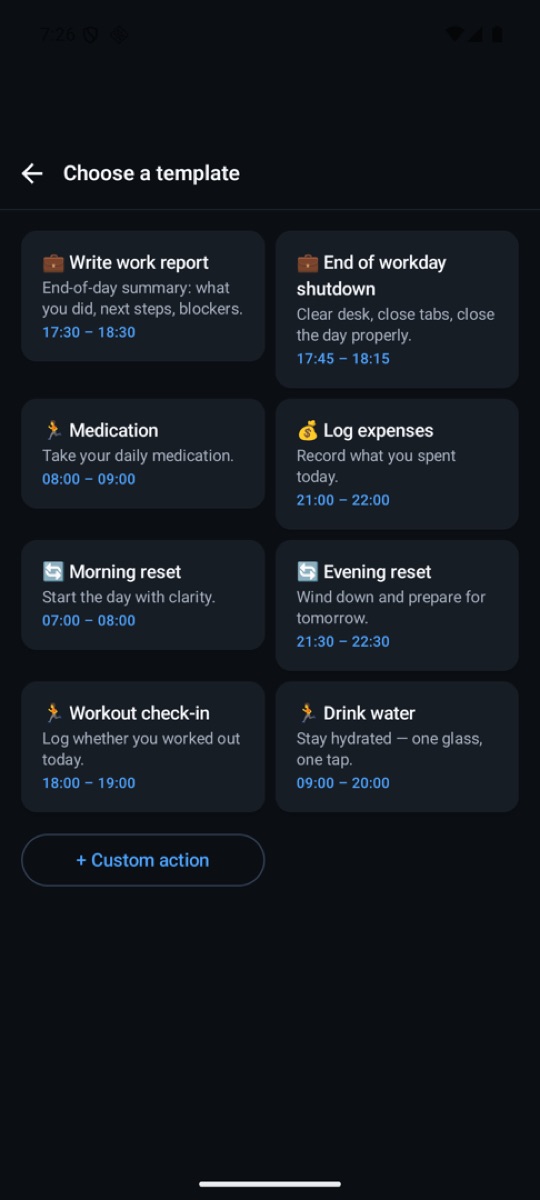
- Eight templates that already have a window
- The hardest part of the first five minutes is deciding what "morning reset, sort of, most days" means as a schedule. Each template ships with a window and a completion type already chosen; change anything, or start blank.
Two clients, one set of habits
The Telegram Mini App installs nothing: reminders arrive as messages and you answer them in the chat, on whatever device Telegram is open on. The Android app is for the case that matters most — it owns its own alarms, so a reminder does not depend on a chat app being allowed to wake the phone.
Link them and they hold the same habits. There is no account to create, no sign-in and no first-run setup beyond picking a habit; the Android build is 4.8 MB and needs Android 8.0 or newer.
Distributed from its own page, and honest about why
The app is signed and installable today, and the landing page serves the APK directly with its SHA-256 printed beside it. That is not a preference for side-loading: it is what a product does while a store listing is still in the queue.
It matters because the two copies are signed with different keys — the store's and our own — so they cannot update each other and one will refuse to install over the other. The download page says so rather than letting somebody discover it as a failed install.
Who it is for
People whose day does not run to a timetable. Shift workers, parents, anyone whose 07:00 is occupied by something that will not reschedule. The whole product is one bet: that most abandoned habits were not a failure of discipline but a failure of timing, and that a window fixes more of them than a louder alarm does.
It is less useful if your day genuinely is a timetable and an alarm at 07:00 works — in that case an alarm at 07:00 is a simpler tool and you should use it.
At a glance
- Live at
- complevia.fyi · Telegram at @complevia_bot
- Runs on
- Telegram Mini App · Android 8.0+
- The idea
- A time window per habit, never a single alarm time
- Escalation
- Soft · Focused · Strict — the ladder never climbs past the style you pick
- Completion
- One tap · yes/no · a small form · a checklist
- Templates
- 8, each with a window and a completion type
- Download
- Signed APK, 4.8 MB, SHA-256 published beside it
- Account
- None — no sign-in, no first-run setup
- Languages
- 21
- Price
- Free
Questions people actually ask
What is wrong with a normal reminder time?
Nothing, if you are free at that time. If you are not, you snooze it and the notification is gone; the habit scores zero for something you would have done two hours later. A window has no single minute to miss.
Will it turn into an alarm clock that shouts at me?
Only as far as you allow. Prompts escalate — heavier vibration, then the device alarm tone — but never past the style you picked: Soft, Focused or Strict.
Do I need the Android app?
No. The Telegram version installs nothing and holds the same habits. The Android app exists because it owns its own alarms, which is more reliable than depending on a chat app being allowed to wake the phone.
Is it on Google Play?
Not yet — the page serves the signed APK meanwhile, with its checksum printed. The store copy and this copy are signed with different keys, so they cannot update each other; pick one.
Does it cost anything?
No, and there is no account to create.
 MSGView
 PubOpener
 SignalOps